# ProTable - 高级表格
ProTable 的诞生是为了解决项目中需要写很多 table 的样板代码的问题,所以在其中封装了很多常用的逻辑。这些封装可以简单的分类为预设行为与预设逻辑。
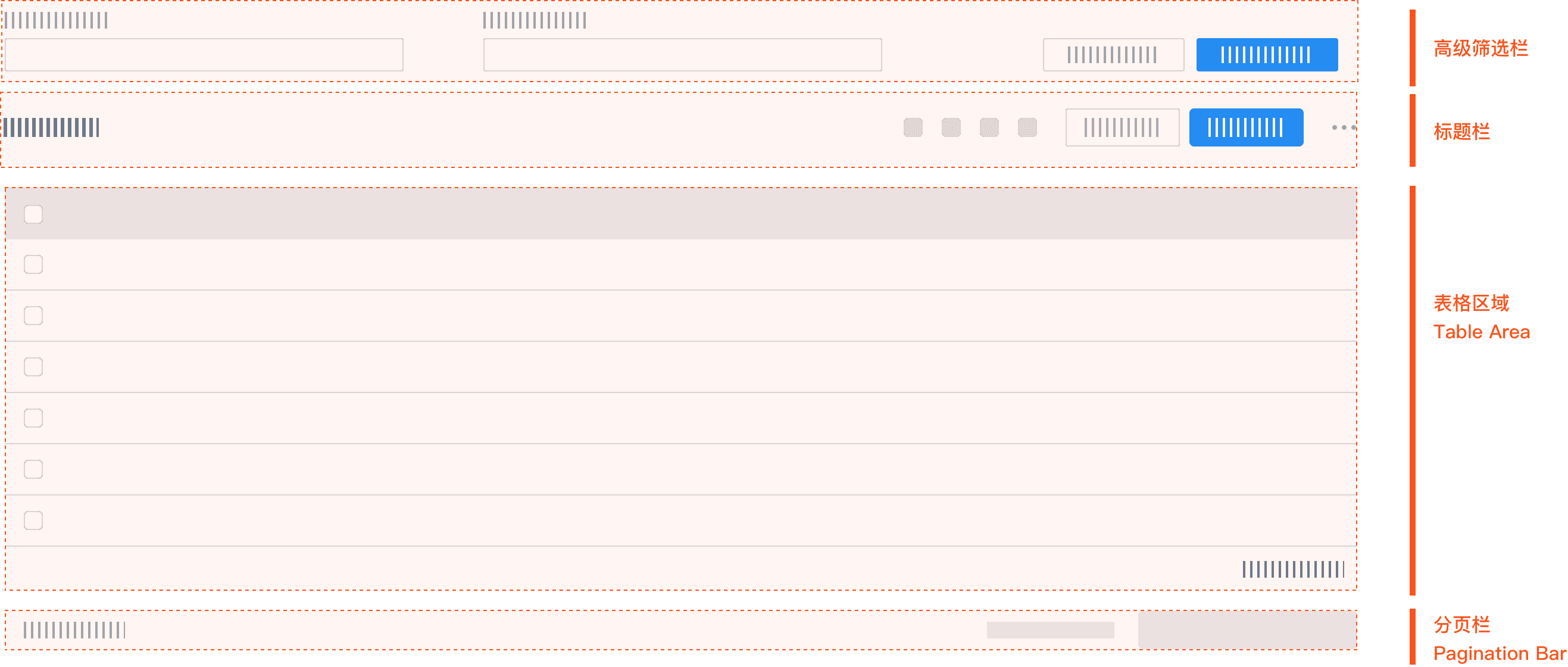 图片来源 Antd ProTable (opens new window)
# 基础用法
<template>
  <ProTable
    ref="proTableRef"
    :columns="columns"
    :dataSource="dataSource"
    :total="total"
    :loading="loading"
    @onParams="onParams"
  >
    <div>
      <el-button @click="setFieldValue">setFieldValue</el-button>
      <el-button @click="setFieldsValue">setFieldsValue</el-button>
    </div>
  </ProTable>
</template>

<script>

const TOTAL_RECORDS = 256

export default {
  name: 'BasicProTable',
  computed: {
    columns() {
      return [
        {
          'min-width': 120,
          label: '姓名',
          prop: 'name',
          valueType: 'input'
        },
        {
          'min-width': 180,
          label: '日期',
          prop: 'date',
          valueType: 'date-picker',
          sortable: 'custom'
        },
        {
          'min-width': 120,
          label: '省/直辖市',
          prop: 'province',
          valueType: 'select',
          valueEnum: {
            'beijing': '北京',
            'shanghai': '上海',
            'zhejiang': '浙江'
          }
        },
        {
          width: 240,
          label: '地址',
          prop: 'address',
          'show-overflow-tooltip': true
        },
        {
          width: 120,
          label: '操作',
          fixed: 'right',
          renderCell: () => [
            <el-button type="text">详情</el-button>,
            <el-button type="text">编辑</el-button>
          ],
          key: 'action'
        }
      ]
    },
  },
  data() {
    return {
      dataSource: undefined,
      total: 0,
      loading: false
    }
  },
  methods: {
    setFieldValue() {
      this.$refs.proTableRef.setFieldValue('name', 'Li Hua')
    },
    setFieldsValue() {
      this.$refs.proTableRef.setFieldsValue({
        province: 'shanghai'
      })
    },
    onParams(params) {
      console.log('params', params)

      const { pageSize, pageNum } = params
      const data = Array.from({ length: TOTAL_RECORDS }, (_, index) => ({
        id: index,
        name: '名称' + Math.random().toString().slice(2, 6),
        date: '2026-03-21',
        province: index % 3 === 0 ? 'beijing' : index % 3 === 1 ? 'shanghai' : 'zhejiang',
        address: '这是一段很长很长很长很长很长很长很长很长很长很长很长很长的内容'
      }))
      this.loading = true
      setTimeout(() => {
        this.loading = false
        this.dataSource = data.slice((pageNum - 1) * pageSize, pageNum * pageSize)
        this.total = TOTAL_RECORDS
      }, 200)
    }
  }
}
</script>
1
2
3
4
5
6
7
8
9
10
11
12
13
14
15
16
17
18
19
20
21
22
23
24
25
26
27
28
29
30
31
32
33
34
35
36
37
38
39
40
41
42
43
44
45
46
47
48
49
50
51
52
53
54
55
56
57
58
59
60
61
62
63
64
65
66
67
68
69
70
71
72
73
74
75
76
77
78
79
80
81
82
83
84
85
86
87
88
89
90
91
92
93
94
95
96
97
98
99
100
101
102
103
104
105
2
3
4
5
6
7
8
9
10
11
12
13
14
15
16
17
18
19
20
21
22
23
24
25
26
27
28
29
30
31
32
33
34
35
36
37
38
39
40
41
42
43
44
45
46
47
48
49
50
51
52
53
54
55
56
57
58
59
60
61
62
63
64
65
66
67
68
69
70
71
72
73
74
75
76
77
78
79
80
81
82
83
84
85
86
87
88
89
90
91
92
93
94
95
96
97
98
99
100
101
102
103
104
105
# API
ProTable 在 el-form 和 el-table 上进行了一层封装,支持了一些预设。这里只列出与 el-table 不同的 API。
# ProTable Attributes
| 参数 | 说明 | 类型 | 默认值 |
|---|---|---|---|
| search | 搜索表单,传入对象时为搜索表单的配置 | boolean | searchConfig | true |
| className | el-table 的类名 | string | - |
| dataSource | el-table 的数据 | Array | - |
| loading | 表格数据请求加载状态 | boolean | - |
| total | 数据总条数 | number | 0 |
| tableProps | el-table attributes 的配置 | TableProps | - |
| tableEvents | el-table events 的配置,默认添加了 sort-change 事件 | TableEvents | - |
| columns | 列定义 | columnsConfig[] | - |
| paginationProps | el-pagination attributes 的配置 | PaginationProps | defaultPaginationProps |
| paginationMapping | 分页参数字段映射配置 | paginationMapping | - |
| initialValues | 表单默认值 | object | - |
| defaultSize | 默认的 size | medium | small | mini | - |
| manualRequest | 是否需要手动触发首次请求。配置为 true 时不可隐藏搜索表单 | boolean | false |
| columnSettings | 列设置 | boolean | columnSettingsConfig | true |
# ProTable Events
| 参数 | 说明 | 类型 | 默认值 |
|---|---|---|---|
| onParams | 查询、重置、分页、排序 触发,获取查询参数 | (params) => Promise<void> | void | - |
| onSubmit | 提交表单时触发 | (params) => void | - |
| onReset | 重置表单时触发 | () => void | - |
| onCollapse | 展开、收起搜索表单 | (collapsed: boolean) => void | - |
| onKeyChange | 列设置(排序、重置)导致的表格重新渲染完成的回调 | () => void | - |
# ProTable Methods
| 参数 | 说明 | 类型 | 默认值 |
|---|---|---|---|
| setFieldsValue | 手动更新表单数据 | (values) => void | - |
| setFieldValue | 手动更新单个字段数据 | (key, value) => void | - |
| reload | 刷新,接收一个参数:是否重置页码,resetPageIndex 默认 true | (resetPageIndex: boolean) => void | - |
| getTableRef | 获取 el-table 的 ref | () => ref | - |
# 标题栏 slot
| name | 描述 |
|---|---|
| - | 高级筛选栏 和 表格区域之间的区域 |
# searchConfig
| 参数 | 说明 | 类型 | 默认值 |
|---|---|---|---|
| searchText | 查询按钮的文本 | string | 查询 |
| resetText | 重置按钮的文本 | string | 重置 |
| labelWidth | 标签的宽度 | string | 80px |
| labelPosition | 标签的位置 | left | right | right |
| rowProps | el-row attributes 的配置 | RowProps | { gutter: 8 } |
| colProps | el-col attributes 的配置 | ColProps | defaultColConfig |
| className | 组件内 el-form 的类名 | string | - |
| defaultCollapsed | 默认是否收起 | boolean | true |
| collapsed | 是否收起 | boolean | - |
| defaultExpandedRows | 默认展开的行数 | number | 2 |
# defaultColConfig
const defaultColConfig = {
  xs: 24, // <768px
  sm: 24, // >=768px
  md: 12, // >=992px
  lg: 8,  // ≥1200px
  xl: 6,  // ≥1920px
}
1
2
3
4
5
6
7
2
3
4
5
6
7
# columnsConfig 列定义
下面列出了与 el-table-column attributes 不同的 API。
| 参数 | 说明 | 类型 | 默认值 |
|---|---|---|---|
| formItemProps | el-form-item attributes 的配置。rules 配置不生效 | FormItemProps | - |
| renderLabel | 自定义 el-form-item 的 label,不支持 slot 写法 | () => jsx | - |
| valueType | 表单元素类型,会生成不同的渲染器。设置 slot 表示自定义,可选 | valueType | slot | - |
| renderField | 自定义表单元素,可选 | ({ form, formItem }) => jsx | - |
| fieldProps | 表单元素的 attributes。如果渲染出来的是 el-input,则对应 el-input 的 attributes | object | - |
| fieldEvents | 表单元素的 events。如果渲染出来的是 el-input,则对应 el-input 的 events | object | - |
| options | 选择器、单选框组、多选框组 的数据 | Array | - |
| valueEnum | 选择器枚举,方便自动生成选项 | valueEnum | - |
| optionLoader | 异步生成 选择器、级联选择器 下拉数据 | () => Promise<any> | - |
| initialValue | 表单默认值,优先级高于 initialValues | any | - |
| order | 查询表单中的权重,权重大排序在前 | number | - |
| hideInSearch | 在查询表单中不展示此项 | boolean | - |
| hideInTable | 在表格中不展示此项 | boolean | - |
| renderCellHeader | 自定义表格标题 | ({ column, $index }) => jsx | - |
| renderCell | 自定义表格内容 | (scope) => jsx | jsx[] | - |
| disabled | 当前列在列设置中是否可被勾选 | boolean | - |
| key | vue 需要的 key,如果是 type: index|selection|expand 或已经设置了唯一的 prop,可以忽略这个属性
| string | - |
如果表格和表单的
prop是同一个,则只需要配置表格的prop字段。同理label字段。
renderField自定义渲染是值的传递。如果prop存在,则默认进行了初始化;反之则需要在initialValues添加默认值。
配置
valueEnum在表格中会自动回显label值,注意Map类型取值需要匹配类型。
# valueType slot
| name | 描述 |
|---|---|
[prop] | 自定义表单元素,参数为 ({ form, formItem }) |
# defaultPaginationProps
{
  "page-sizes": [10, 20, 30, 50],
  layout: "total, sizes, prev, pager, next, jumper",
  "hide-on-single-page": true,
}
1
2
3
4
5
2
3
4
5
# paginationMapping
| 参数 | 说明 | 类型 | 默认值 |
|---|---|---|---|
| pageKey | 页码字段 | string | pageNum |
| sizeKey | 页数字段 | string | pageSize |
通过
Vue.extends方法,可以全局配置这两个字段,参考下方示例代码。
import Vue from 'vue'
import { ProTable as ElProTable } from 'element-ui-pro-components'

const ProTable = Vue.extend({
  name: 'ProTable',
  extends: ElProTable,
  props: {
    // 分页字段映射配置
    paginationMapping: {
      type: Object,
      default: () => ({
        pageKey: 'page',
        sizeKey: 'size'
      })
    }
  }
})

Vue.component(ProTable.name, ProTable)
/* 或写为
 * Vue.use(ProTable)
 */
1
2
3
4
5
6
7
8
9
10
11
12
13
14
15
16
17
18
19
20
21
22
2
3
4
5
6
7
8
9
10
11
12
13
14
15
16
17
18
19
20
21
22
# columnSettingsConfig
列设置功能提供了灵活、可配置的表格列管理能力,支持动态显示/隐藏列、列排序、固定列等功能,适用于复杂的数据展示场景。
| 参数 | 说明 | 类型 | 默认值 |
|---|---|---|---|
| columnSetting | 列设置文本 | string | 列设置 |
| columnDisplay | 列展示文本 | string | 列展示 |
| resetText | 重置按钮文本 | string | 重置 |
| draggable | 是否支持拖拽排序 | boolean | true |
| checkable | 显示/隐藏列 | boolean | true |
列设置中标题取
columnsConfig.label字段。
显示/隐藏列取
columnsConfig.prop || columnsConfig.key。
列设置排除了
columnsConfig.type字段。
拖拽排序遵循的是先排序,后分组,目的是保证列是整体有序的。
举个例子:
[
  { label: '标题1', prop: 'title1' }, // 不固定
  { label: '标题2', prop: 'title2', fixed: 'right' }, // 固定在右侧
  { label: '标题3', prop: 'title3', fixed: 'left' }, // 固定在左侧
  { label: '标题4', prop: 'title4' } // 不固定
]
1
2
3
4
5
6
2
3
4
5
6
当拖拽 prop = title4 到 prop = title1 上方的位置时,固定列的位置也会发生变化。
[
  { label: '标题4', prop: 'title4' }, // 不固定
  { label: '标题1', prop: 'title1' } // 不固定
  { label: '标题2', prop: 'title2', fixed: 'right' }, // 固定在右侧
  { label: '标题3', prop: 'title3', fixed: 'left' }, // 固定在左侧
]
1
2
3
4
5
6
2
3
4
5
6